Two posts I will not repeat here
This post builds on two earlier ones and makes no sense without them, so I will start with an honest reference.
In April last year, I described how I start a database from the test code. That post was local: my laptop, my Docker, one [Fact], and a connection to a container that started and then promptly disappeared. In November, I took the same setup to an Azure Pipelines agent, where the only question that really hurt came up: where is the Docker daemon, and can the job see it? The answer was “on the agent host,” and the conclusion was “do not put this job in container:, because then localhost for the test process stops being the host.”
I will not repeat either the database fixture or mapDockerSocket here. Repeating them would not improve either one.
That pipeline was missing one layer for me: the browser. Integration tests with a real MSSQL database told me that the data layer was alive. Nothing in the same run told me whether a person could click through the application. I had had the browser since May, when I set up my first project with @playwright/test, but that post deliberately ended with npx playwright test on my laptop and a promise that YAML would come later. Later is now.
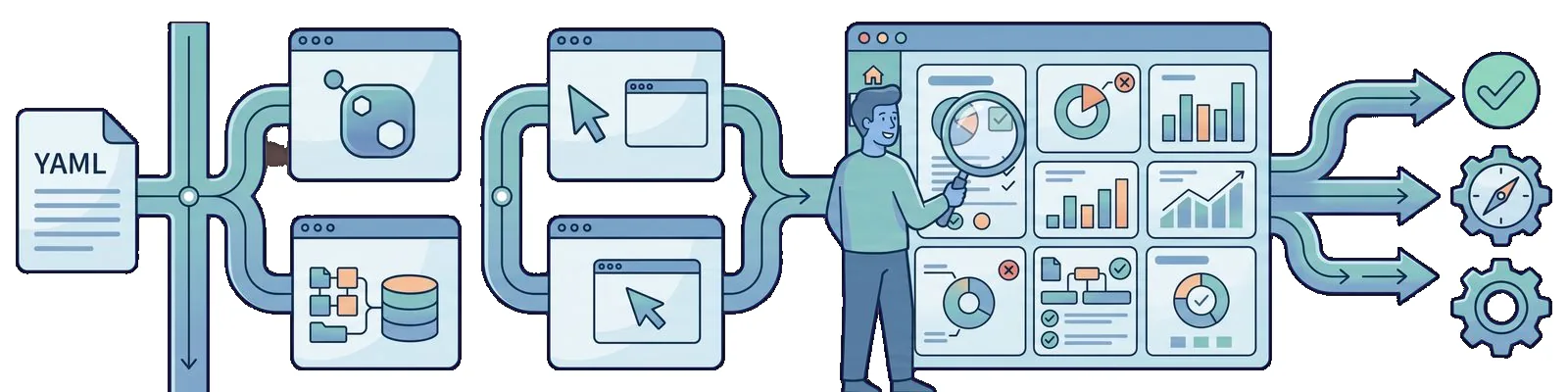
Today’s goal is narrow: one pipeline file in which both layers run from the same commit. Testcontainers containers for .NET integration tests and Playwright for going through the UI. Not two repositories, not two schedules, and not two conversations about who checks which report.
The .NET package changed its name
Before I get to YAML, there is one NuGet detail, because otherwise the first command will not run.
Until June, I used the name DotNet.Testcontainers, and that is what both previous posts show. On June 21, a package named Testcontainers appeared on NuGet in version 2.0.0: the same project under a name consistent with the rest of the Testcontainers family. I am using 2.1.0 from July 20, and that is the version on which I made every run described below.
<PackageReference Include="Testcontainers" Version="2.1.0" />No range and no wildcard, for exactly the same reason that I pinned 1.5.0 in November: when a run turns red, I want to know whether my code changed or the underlying library did.
Two practical notes from the migration.
First, the package name changed before the code did. After replacing the PackageReference, I did not have to change a single using in the test project, and the builder is still called TestcontainersBuilder. This means that moving from the 1.x line to 2.1.0 is a one-line change for me and does not require a separate sprint.
Second, and this is a mistake I personally made: you cannot have both packages in the same csproj at once. I left the old PackageReference next to the new one, expecting NuGet to sort it out somehow, and got a build full of conflicts between identically named types from two assemblies. Either the old name or the new one. If the team is not ready to migrate, a sensible August pin is DotNet.Testcontainers version 1.6.0 from June 7, but then the project must not contain a single line with the new package.
One thing I am deliberately not turning into a separate topic is container cleanup. Resource Reaper in this line simply works and closes what remains after an interrupted run. That is a library implementation detail, not something I have to configure in YAML.
Playwright 1.25 on the agent
The JavaScript pin is just as straightforward. @playwright/test version 1.25.0 was released on August 11, four days ago, and it is the only version on which I checked anything here.
{
  "engines": {
    "node": ">=16"
  },
  "devDependencies": {
    "@playwright/test": "1.25.0"
  }
}
I stay on Node 16 LTS, and that is not laziness. 1.25 still officially supports Node 12, which shows both how broad the supported version matrix is and how little it says about what I want to use for CI. Sixteen is the middle ground: longer-lived than 12, calmer than the line that will not become LTS until the autumn. I set it explicitly on the agent because the default Node version in the agent image moves just like ubuntu-latest.
I have two valid ways to run the browsers on a clean Linux machine.
The first is to install the system libraries on the agent host:
$ npx playwright install --with-depsThis adds the system dependencies and downloads the Chromium, Firefox, and WebKit builds bundled with 1.25.0. It costs a minute or two of cold-start time on every run.
The second is a ready-made browser image, mcr.microsoft.com/playwright:v1.25.0-focal. The 1.25 release also adds a v1.25.0-jammy variant, but since I keep the agent on ubuntu-20.04, I stay with Focal so that glibc in the image and on the host do not drift apart.
This is where the trap that prompted this entire section appears. It is tempting to attach that image as container: for the whole job, since it already contains everything needed. If dotnet test with Testcontainers is to run in the same job, I return directly to the November problem: the database containers become siblings of the job container rather than its children, and localhost in the test process stops pointing to the host. The Playwright image is fine as a container job if and only if that job does not use Testcontainers.
One YAML, two layers
I therefore have two layers with different requirements: one needs the .NET SDK and the Docker socket, while the other needs Node and browsers. There are two ways to combine them in one file, and I chose the first.
Path A, recommended: two jobs. The first job runs dotnet test with Testcontainers on the agent host. The second runs Playwright. Each gets only what it needs, each has its own duration and artifact, and a red result immediately tells me which layer failed without making me read the log.
There is one detail that needs to be stated explicitly because intuition suggests otherwise. The database container started in the first job will not survive into the second job. These are two different machines, not two steps on one machine. If Playwright needs a target, either the second job starts the application itself (in my case with a Compose file and the docker compose command, because V2 has been GA since April and the hyphen has disappeared from the command), or it targets a fixed environment that runs independently of the pipeline. Passing a live URL from one job to another is not an option.
Path B: one job. First dotnet test, then docker compose up, then npx playwright test with BASE_URL pointing to the host’s localhost. This makes sense for a small project where the overhead of a second machine, a second checkout, and a second environment setup is greater than the benefit of separation. In return, I pay with one long job that installs the entire stack whether it needs it or not, and with a log that has to be searched.
The same November rule applies to both paths: a job that starts containers from test code runs on the agent host.
Azure Pipelines and GitHub Actions
I will show both because the model is identical and only the syntax differs. I will start with Azure Pipelines because that is where this pipeline runs for me.
trigger:
  - main

pr:
  - main

variables:
  buildConfiguration: Release
  dbImage: mcr.microsoft.com/mssql/server:2019-latest
  appUrl: http://localhost:5000

jobs:
  - job: integration
    displayName: Integration tests with Testcontainers
    pool:
      vmImage: ubuntu-20.04
    steps:
      - task: UseDotNet@2
        displayName: SDK
        inputs:
          packageType: sdk
          version: 6.0.x

      - script: |
          docker version
          docker info --format '{{.OperatingSystem}}'
        displayName: What the agent has

      - script: docker pull $(dbImage)
        displayName: Pull the database image

      - task: DotNetCoreCLI@2
        displayName: dotnet test
        inputs:
          command: test
          projects: "**/*IntegrationTests.csproj"
          arguments: "--configuration $(buildConfiguration) --logger trx --results-directory $(Agent.TempDirectory)"

  - job: e2e
    displayName: Playwright 1.25
    dependsOn: integration
    pool:
      vmImage: ubuntu-20.04
    steps:
      - task: NodeTool@0
        displayName: Node 16
        inputs:
          versionSpec: 16.x

      - script: npm ci
        displayName: npm ci

      - script: npx playwright install --with-deps
        displayName: Browsers and system libraries

      - script: docker compose -f docker-compose.e2e.yml up -d
        displayName: Application under test

      - script: |
          for i in {1..90}; do
            if curl -fsS $(appUrl)/health > /dev/null; then
              echo "ready after ${i}s"
              exit 0
            fi
            sleep 1
          done
          echo "the application does not respond on /health"
          docker compose -f docker-compose.e2e.yml logs
          exit 1
        displayName: Waiting for /health

      - script: npx playwright test
        displayName: npx playwright test
        env:
          BASE_URL: $(appUrl)
          CI: "true"

      - task: PublishPipelineArtifact@1
        condition: always()
        displayName: Playwright report
        inputs:
          targetPath: playwright-report
          artifact: playwright-report
The same model in GitHub Actions, using this year’s action major versions:
name: tests

on:
  push:
    branches: [main]
  pull_request:
    branches: [main]

jobs:
  integration:
    runs-on: ubuntu-20.04
    steps:
      - uses: actions/checkout@v3
      - uses: actions/setup-dotnet@v2
        with:
          dotnet-version: "6.0.x"
      - run: docker version
      - run: dotnet test --configuration Release --logger trx --results-directory TestResults
      - uses: actions/upload-artifact@v3
        if: always()
        with:
          name: trx
          path: TestResults

  e2e:
    runs-on: ubuntu-20.04
    needs: integration
    steps:
      - uses: actions/checkout@v3
      - uses: actions/setup-node@v3
        with:
          node-version: 16
          cache: npm
      - run: npm ci
      - run: npx playwright install --with-deps
      - run: docker compose -f docker-compose.e2e.yml up -d
      - name: Waiting for /health
        run: |
          for i in {1..90}; do
            curl -fsS http://localhost:5000/health > /dev/null && exit 0
            sleep 1
          done
          docker compose -f docker-compose.e2e.yml logs
          exit 1
      - run: npx playwright test
        env:
          BASE_URL: http://localhost:5000
      - uses: actions/upload-artifact@v3
        if: always()
        with:
          name: playwright-report
          path: playwright-report/
Several details in both files are deliberate.
I use ubuntu-20.04 instead of ubuntu-latest in both jobs for the same reason as nine months ago. latest will eventually jump to the next LTS without my involvement, and I want that to be a one-line change in a commit, not a red Monday.
The docker version step in the integration job costs one second and distinguishes “there is no daemon” from “the test failed.” It is absent from the Playwright job because Docker is only used there to start the application through Compose, and a failure is immediately visible in the up step.
The loop waiting for /health in Azure uses {1..90}, not $(seq 1 90), and this is not a matter of taste. In a script step, $( ) is seen first by Azure Pipelines variable substitution and only then by the shell. Mixing both syntaxes in one loop is the shortest route to a step that behaves differently from the same script run locally.
The artifacts use condition: always() and if: always() because I need the report from a red run more than the one from a green run. This is the same rule I followed with PublishTestResults@2 in November.
On the Playwright side, the artifact is the playwright-report directory from the HTML reporter plus trace.zip for failed tests. I have trace set to on-first-retry, so a green run costs nothing and the first red one leaves a complete set of evidence to open the next day. I described this setting in the May post about my first project and do not change anything in it for CI.
The Cypress pipeline I showed two years ago did half of what this file does: it set up Node, started a browser, and ended with a red or green result. It did not have a single layer of containers started from test code because I did not need one then. The difference between that YAML and this one is not the difference between Cypress and Playwright. It is the difference between “I test the UI of an application deployed somewhere” and “the entire stack under test starts during the run.”
Ordering, waiting, and flake
Three things in this setup generate random red results. All three are about time.
Cold pull. I get a fresh hosted agent, so the database image is downloaded again on every run. This is not a failure. It is the cost of entry, but it needs to be measured instead of coming as a surprise. That is why the integration job has a separate docker pull step before the tests: the library would download the image itself when the container starts, but then that time would sit inside dotnet test and I could not show it to anyone asking why the pipeline had slowed down.
Waiting for the application. The step with the curl loop looks crude next to the rest of the file, and I deliberately did not replace it with sleep 30. A fixed pause is always either too short or too long, and it lies in both cases. The health endpoint loop ends in the second when the application actually responds, and on failure it prints the Compose logs into the same run in which I am looking for the cause. If the application does not have /health, this is a good time to add it rather than guess the startup time.
A race in the data layer. This pipeline does not fix it, and I do not pretend that it does. An integration test that writes to the database and reads immediately can flicker regardless of where the container runs. I described that pattern separately when discussing a retry policy, and if I see a random red result after moving to CI, I check it first before I start blaming the agent.
On the UI side, the equivalent problem is the temptation to increase retries in the Playwright configuration to three and consider the matter closed. I do not do that. Web-first assertions already retry the check until the timeout, so waiting for an element is built into expect. Retrying the whole run as a strategy is not stabilization but hiding the result, and I have known this since I broke down parallelism in CI: isolation first, then acceleration.
The order of the jobs is also a decision. I set dependsOn and needs so that Playwright starts only after the integration tests are green. This is not because one technically needs the other, but because when the data layer fails, a run through the UI will tell me the same thing ten minutes later and less precisely. When both jobs are stable enough, I will run them in parallel and pay for it with two reports instead of one.
Windows versus Linux, again
This section is short because the answer is the same as in November, only the question came from the other side.
Playwright works flawlessly on windows-2019. The browsers are available, npx playwright install downloads them, and the tests pass. It may therefore be tempting to put the whole pipeline on Windows if the product is built there anyway.
Testcontainers with a Linux database image will not run on the same agent. The Docker daemon runs in one mode at a time, the default mode on a hosted Windows agent is Windows containers, and the MSSQL image started by my test is a Linux image. The pull ends with a platform mismatch message, and there is nothing to configure on the library side that can change this.
The conclusion is the same as before: the Testcontainers job runs on Linux. If the product has to be built on Windows, that is a third job in the same file, not a reason to move the tests there.
What I deliberately leave out of this file
Several things were within reach and did not make it into this YAML. I am listing them so that six months from now it will be clear that these were decisions.
In-process host. Some tests that start a database container today do not actually need it because they check API-layer logic rather than writing to MSSQL. Such tests can run against an in-process test host, without Docker and without a second of cold pull. This is a different model from everything in this post and deserves its own text, which I have not written yet. I do not want to blend both techniques into one tutorial because they answer different questions.
Visual regression. toHaveScreenshot() has been in Playwright since May, and it is tempting to add image comparison to the e2e job. I am not doing it today because screenshots in CI require a discussion about tolerance thresholds, rendering differences between machines, and who approves new baselines. Adding it to the existing pipeline without those agreements would give me red runs with no information.
Component testing. It is still marked experimental, and I do not add experiments to the file on which a merge to main depends.
Page objects and UI test architecture. For now, my e2e job runs a handful of smoke tests. When that grows, the question of structure will return. I already settled it once while refactoring page objects, and it is a topic for a separate post, not a section in a text about YAML.
Summary
Three conclusions after combining both layers in one file.
- Splitting the pipeline into two jobs beat one long job, but not because it is faster. It is faster to read. A red
integrationjob and a rede2ejob are two different conversations in the team, and I want to distinguish them in the run list, not in the log. - A container started in one job does not exist in the other, so each job is responsible for its own environment. That one realization saved me more time than the entire rest of this post.
- The November model has not changed. Docker sits on the agent host, and the Testcontainers job runs next to it rather than inside another container. The only change is that another job, with a browser, now runs next to that one.
What I do not know after this month is whether I can run e2e in parallel with integration without increasing the number of flickering results, and how many of the current smoke tests will survive the first real layout change. The answer to both questions is not in YAML. It is in the process around the tests, while I made the decision about the tool itself back in April and still do not regret it.